Storage Quota
Checking your storage quota
Run storage_quota to see your current usage and limits across all allocations.
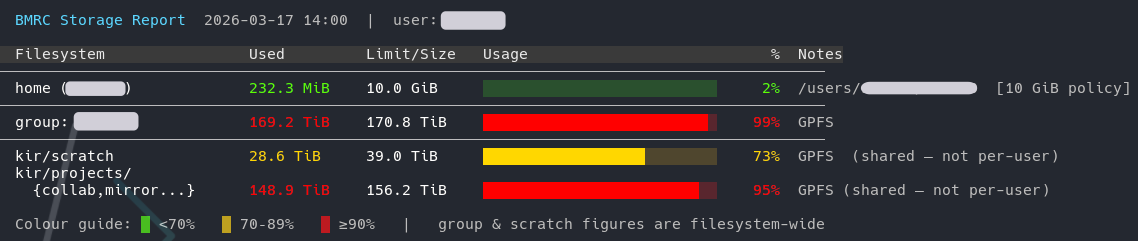
storage_quota is part of the KIR-utils module. If you see command not found, load it first:
As a fallback, you can also check your group allocation directly:
If your home directory is nearly full
Your home directory has a small quota and is not intended for large data. If it is filling up, take action promptly — a full home directory can prevent jobs from running and cause login issues.
To identify what is taking up space, including hidden directories:
This lists the top-level contents of your home directory in descending order of size.
- Common offenders are the hidden directories such as
.cache,.apptainerand.conda.
.cache
The ~/.cache directory is used by many tools (pip, uv, Hugging Face, Matplotlib, font caches, etc.) to store temporary and reusable data. It can grow to many gigabytes without you noticing, and most of its contents can be safely regenerated.
You have two options:
Option 1 — Delete it
If you just need to reclaim space quickly:
The directory and its contents will be recreated by tools as needed.
Option 2 — Move it to scratch and symlink (recommended)
A better long-term fix is to relocate .cache to scratch space, where there is far more room, and leave a symlink behind so tools still find it at the expected path.
For KIR, scratch lives at /well/kir/scratch/{group}. Create a personal directory inside your group's scratch space, move .cache there, then symlink it back:
# Create your own directory in scratch (replace {group} and {username})
mkdir -p /well/kir/scratch/{group}/{username}

# Move .cache to scratch
mv ~/.cache /well/kir/scratch/{group}/{username}/.cache

# Create a symlink from home back to the new location
ln -s /well/kir/scratch/{group}/{username}/.cache ~/.cache
After this, anything written to ~/.cache is transparently stored on scratch, keeping your home directory quota free.
Scratch is not backed up
Scratch space is not backed up and may be subject to periodic cleanup. This is fine for cache data, which is regenerable, but do not use this approach for data you cannot afford to lose.