Data Transfer with CLI Tools
Transfer files between your local machine and the BMRC cluster using scp or rsync over SSH.
Set up your SSH config first
Follow the recommended terminal setup guide before using the commands on this page. This configures short hostnames (bmrc4, bmrc5, etc.) so you can use them directly in scp and rsync — no need to type username@cluster4.hpc.in.bmrc.ox.ac.uk every time.
How it works
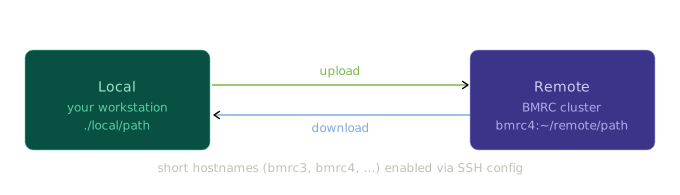
All file transfers run over SSH, following the same local → remote or remote → local direction. The source always comes first, the destination second.
scp — secure copy
scp is the simplest option for one-off file transfers.
Upload (local → remote)
# Single file
scp ./myfile.txt bmrc4:~/data/

# Directory (use -r for recursive)
scp -r ./results/ bmrc4:~/results/
Download (remote → local)
# Single file — copy to current directory
scp bmrc4:~/results/output.csv ./

# Directory
scp -r bmrc4:~/results/ ./local_results/
Note
scp does not resume interrupted transfers. For large files, prefer rsync (see below).
rsync — efficient sync
rsync is preferred for directories, large files, or anything you might transfer repeatedly. It only copies files that have changed, and can resume a partial transfer.
Upload (local → remote)
# Sync a directory
rsync -av ./results/ bmrc4:~/results/

# With progress bar and partial resume
rsync -av --progress --partial ./large_dataset/ bmrc4:~/data/large_dataset/
Download (remote → local)
Dry run first
Use -n (--dry-run) to preview what will be transferred before committing:
Trailing slash matters in rsync
rsync -av ./results/ bmrc4:~/dest/ copies the contents of results/ into dest/.
rsync -av ./results bmrc4:~/dest/ copies the directory itself, creating dest/results/.
When in doubt, use a dry run first.
Common flags
| Flag | scp |
rsync |
Effect |
|---|---|---|---|
-r |
✓ | — | Recursive (directories) |
-v |
✓ | ✓ | Verbose output |
-a |
— | ✓ | Archive mode (preserves permissions, timestamps) |
--progress |
— | ✓ | Show per-file progress |
--partial |
— | ✓ | Keep partial files for resume |
-n / --dry-run |
— | ✓ | Preview changes without transferring |
-z |
✓ | ✓ |
Quick reference
# scp upload
scp [options] <local_source>  <host>:<remote_dest>

# scp download
scp [options] <host>:<remote_source>  <local_dest>

# rsync upload
rsync -av [options] <local_source>/  <host>:<remote_dest>/

# rsync download
rsync -av [options] <host>:<remote_source>/  <local_dest>/
Replace <host> with bmrc4, bmrc5, etc. (requires SSH config setup).