Filesystem layout
When you log in to the cluster you land in your home directory. Unlike most Linux systems, the path is slightly non-standard:
where <group> is your research group name.
Home directory — 10 GB strict quota
Do not use your home directory for active work. The 10 GB limit fills quickly once you start running jobs, installing software, or writing output. Use the paths associated with your group ( below) instead.
Quick-reference diagram
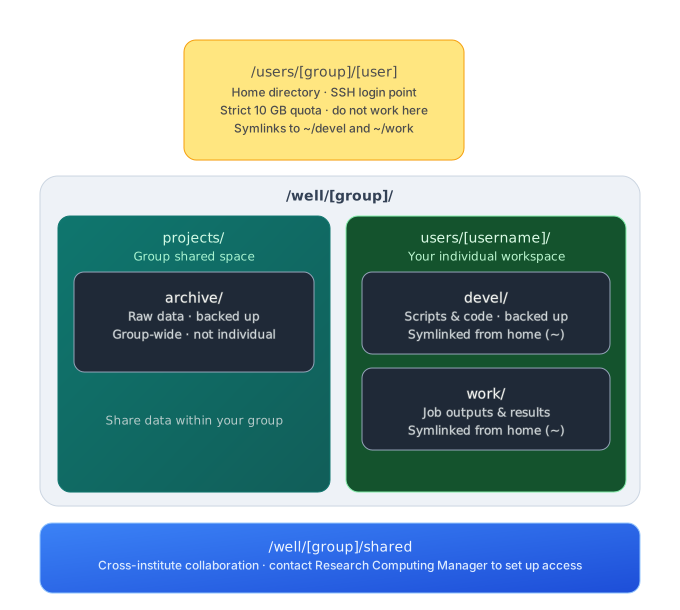
Summary Tree of group file system
/well/<group>/
├── projects
│   ├── archive       # Directory to save raw data as it is backup to KIR tcm
|
├── shared            # This can be used to share data with external groups but we need provision special groups
└── users
    ├── user1         # Individuasansoml work spaces we created for each group member
    │   ├── devel     # devel is also backed up. Therefore, we recommend storing your scripts here
    │   ├── notebooks
    │   └── work
    ├── user2
    │   ├── devel
    │   ├── notebooks
    │   └── work
Where to store raw data
Use /well/<group>/projects/archive for raw, unprocessed data files. This directory is backed up by KIR Research Computing.
This is a Shared space for your group
archive/ is a group-wide directory. Everyone in <group> can read and write here. It is not an individual allocation, so coordinate with your colleagues before writing large datasets.
Where to do your work
Your personal working space lives at:
This is where you should run jobs, install software, and store intermediate files. Two subdirectories are pre-created and symlinked into your home directory for convenience:
| Path | Purpose | Backed up? |
|---|---|---|
devel/ |
Scripts, code, notebooks | Yes |
work/ |
Job outputs, results, scratch | No |
The symlinks mean you can reach them as ~/devel and ~/work immediately after login.
Minimising disk usage
Storage on BMRC is a shared resource. A few habits go a long way:
- Never copy raw data if you can avoid it. If your input files already live in
archive/or a colleague's project directory, create a symlink rather than duplicating them: -
Write outputs to
work/, notdevel/.devel/is backed up — filling it with large result files wastes backup quota and slows snapshots. -
Clean up intermediate files once a pipeline has finished successfully. Temporary BAM files, uncompressed intermediates, and failed run directories accumulate quickly.
-
Compress where practical. Tools like
gzip,bgzip, andzstdcan reduce storage footprint significantly, especially for text-based formats (FASTQ, VCF, BED). -
Check your usage regularly ( refer to Storage Quota )
When in doubt, symlink
Symlinks are free. Copies cost quota. If multiple projects need the same reference genome or input dataset, one copy in archive/ with symlinks pointing to it from each work/ subdirectory is always preferable.
- Also,
work/exists to encourage a project-based layout, but you are free to create your own subdirectory structure inside it as needed.
Sharing within your group
/well/<group>/projects/ is the space for sharing data and output files with colleagues in your group. Store anything you want others to access here.
Collaborating with groups outside KIR
/well/<group>/shared is available for cross-institute collaboration, but access requires special group membership to be configured.
Contact KIR Research Computing Manager to create shared groups.