GPU Nodes Fast local scratch (/flash)
A number of GPU nodes have fast local NVMe drives for jobs that require a lot of I/O.
Unlike the shared GPFS/Lustre filesystem ( filesystem we use to host home, /well/) which is optimised for large, sequential,
parallel throughput, this local storage lives inside the compute node and
excels at random, small-block, high-IOPS access: many small files, frequent
seeks, index/database access, and metadata-heavy workloads.
Where it lives
Local scratch is available at:
/flash/scratch— shared scratch, open to all jobs- project-specific folders under
/flashon the node
It is node-local and ephemeral: data written here is only visible on the node that wrote it, and is not available from the login nodes, other compute nodes, or after the job ends. Treat it as working space for a single job, and stage important results back to GPFS before the job finishes.
Requesting a node with local scratch
Add the --constraint "flash" feature to your Slurm request. For a batch job:
For an interactive session:
You can confirm the node actually has the feature with:
Creating your project folder
It is your responsibility to create a folder for your job. Because
/flash/scratch is shared by all jobs on the node, protect your data by
placing it in a subfolder with restrictive permissions:
Directories need the execute bit
Use 700, not 600. Without the execute (x) bit you will not be able to
cd into the directory or open files inside it (Permission denied).
700 gives you full private access; 750 also lets your group read it.
Always clean up when your job finishes:
Automatic cleanup in your job script
Because /flash/scratch is node-local and shared, always remove your working
directory when the job finishes. The most robust way is a trap, which runs
on normal exit and when the job is cancelled, times out, or errors — so you
don't leave data behind even when the script doesn't reach the end.
Put this near the top of your Slurm script, right after the #SBATCH lines:
#!/bin/bash
#SBATCH -A gpu_<X>.prj
#SBATCH -p gpu_p100_16gb
#SBATCH --gres gpu:1
#SBATCH --constraint "flash"

# --- fast local scratch setup ---
FLASH_DIR="/flash/scratch/$USER/job_$SLURM_JOB_ID"
mkdir -p "$FLASH_DIR"
chmod 700 "$FLASH_DIR"

# Remove the directory on ANY exit: success, error, timeout, or scancel
cleanup() { rm -rf "$FLASH_DIR"; }
trap cleanup EXIT
# --------------------------------

# ... your job runs here, using "$FLASH_DIR" as scratch ...
cd "$FLASH_DIR"
A few points worth knowing:
-
Using a per-job subfolder (
job_$SLURM_JOB_ID) keeps concurrent jobs on the same node from colliding, and means cleanup only ever removes this job's data. -
trap cleanup EXITcovers the common cases (script finishes,set -eabort, and theSIGTERMSlurm sends on timeout/scancel, which triggersEXITonce the shell exits). -
If you run long steps that might be killed by
SIGTERMbefore the shell exits, you can trap the signal explicitly as well so cleanup always runs first:
When should I use it?
Choose your storage based on your access pattern, not just file size:
Use /flash/scratch when… |
Stay on GPFS when… |
|---|---|
| Many small files (thousands+) | A few large files |
| Random reads/writes, frequent seeks | Long sequential streaming reads/writes |
| High IOPS / metadata-heavy (index files, small DB, checkpoint shuffling) | Bulk staging of large datasets |
| You want to take I/O load off the shared filesystem | You need the data visible across nodes |
| Intermediate scratch for a single job | Final results / anything that must persist |
A good pattern is: stage inputs from GPFS → run with heavy random I/O against
/flash/scratch → copy final outputs back to GPFS → clean up.
Benchmark: local flash vs GPFS
The difference is workload-dependent, and it matters which workload you measure.
Large sequential I/O (dd, 4 GiB, 1 MiB blocks) — GPFS is already excellent
here, since it stripes across many storage servers. Local flash offers no
advantage for streaming:
/flash/scratch |
GPFS | |
|---|---|---|
| Sequential write | ~1.2 GB/s | ~3.9 GB/s |
| Sequential read | (cache-influenced) | ~3.8 GB/s |
Random 4k I/O (fio, iodepth 32, 4 jobs, --direct=1) — this is where
local flash wins decisively:
| Metric | /flash/scratch |
GPFS | Advantage |
|---|---|---|---|
| Read IOPS | 32,200 | 520 | ~62× |
| Write IOPS | 32,200 | 533 | ~60× |
| Read bandwidth | 126 MiB/s | 2.0 MiB/s | ~62× |
| Avg read latency | 92 µs | 7,497 µs | ~82× lower |
| p99 read latency | 0.25 ms | 49 ms | ~200× lower |
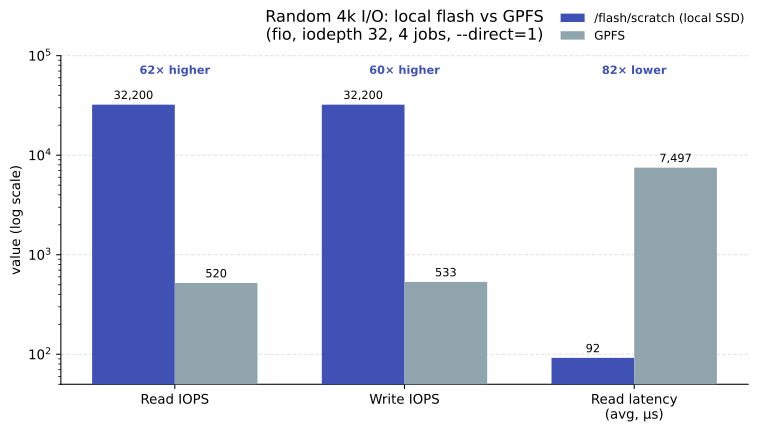
The latency tail is the real story: on GPFS every random read pays a network round-trip to a storage/metadata server, so tail latency runs into tens of milliseconds. On local flash the read hits NVMe directly and stays in the microsecond range. If your job does a lot of random reads or touches many small files, local scratch can turn an I/O-bound job into a compute-bound one.
Benchmark your own workload
These numbers are from a single node and depend on the underlying device
(some nodes use SATA SSDs, others true NVMe). Run a quick fio random-I/O
test on your allocated node if you want to confirm the gain for your
specific access pattern before committing a large job.