Adding Jupyter Kernels
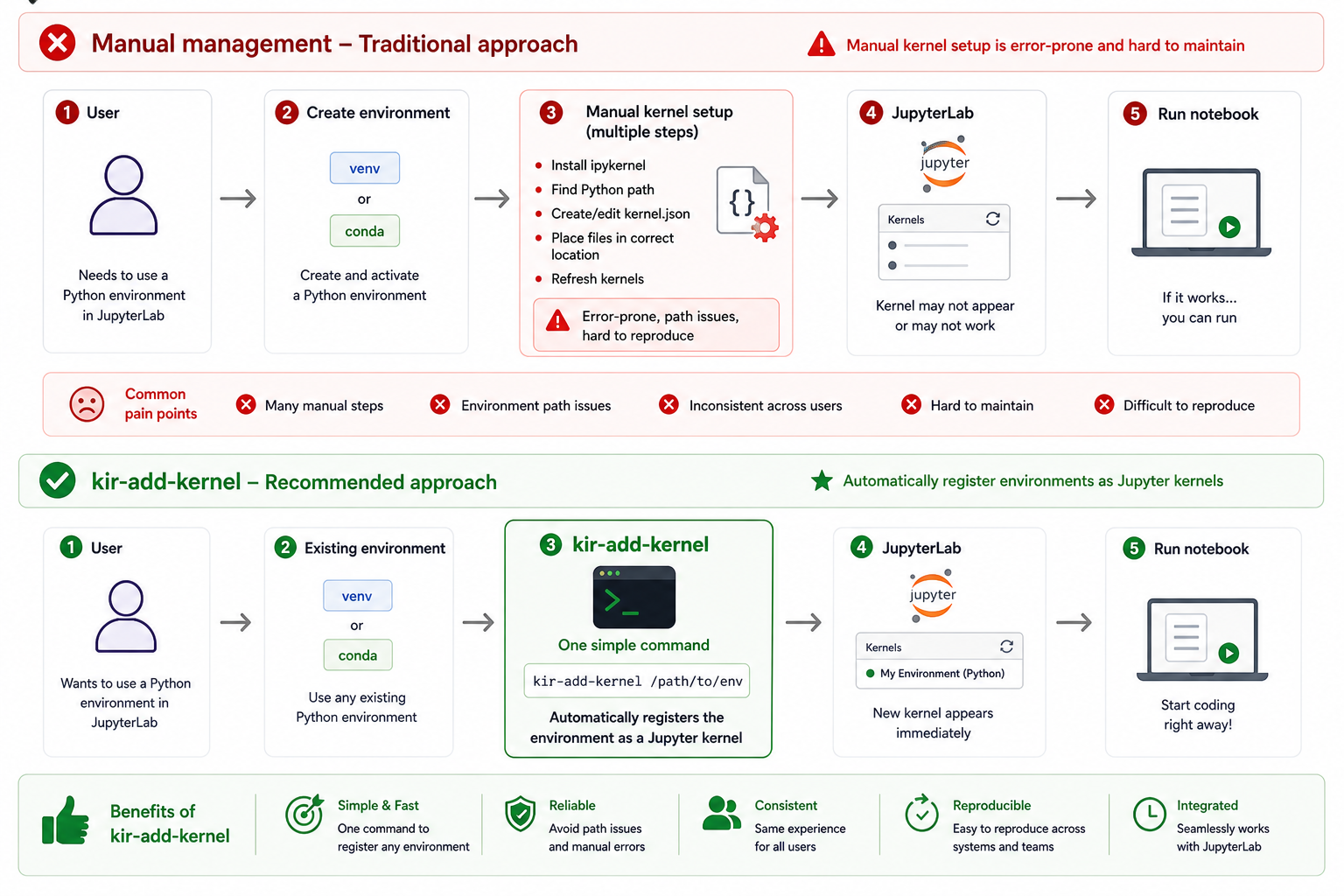
There are two approaches to registering custom kernels with JupyterLab on the cluster:
tool-assisted management via kir-jupyter-helpers, or manual registration using
ipykernel directly. Both are supported — choose whichever fits your workflow.
Option 1 — Tool-assisted management with kir-add-kernel
Recommended for most users
kir-add-kernel keeps your environments untouched and supports shared group kernels —
making it the preferred approach on BMRC.
The primary tool in kir-jupyter-helpers
is kir-add-kernel. It solves a common frustration on HPC clusters: by default, Jupyter requires
ipykernel to be installed inside every environment you want to use as a kernel. This is
invasive — installing ipykernel into a carefully pinned conda environment or virtual environment
can silently upgrade or downgrade other packages, breaking reproducibility.
Instead, kir-add-kernel registers a lightweight wrapper script as the kernel. The wrapper
loads your environment — via the module system, conda, venv, or Apptainer — and delegates to
the ipykernel that ships with the cluster's JupyterLab module. Your environment stays untouched.
An added benefit is shared kernels: a single registration under your group's shared directory makes the kernel available to all group members without each person needing to configure anything.
Usage
kir-add-kernel is bundled with the JupyterLab module — load it first:
Then register your environment as a kernel:
Example — Python virtual environment
Suppose you have a virtual environment with the following:
| Property | Value |
|---|---|
| Environment name | Singlecell_venv |
| Path | /users/group/myname/devel/Singlecell_venv |
| Built with | Python/3.11.3-GCCcore-12.3.0 |
| Desired kernel display name | singlecell |
Register it with:
kir-add-kernel singlecell Python/3.11.3-GCCcore-12.3.0 \
    --venv /users/group/myname/devel/Singlecell_venv
Expected output:
Testing wrapper script
Checking & installing ipykernel package in the kernel environment
Installing kernel: python -m ipykernel install --name singlecell --user
Installed kernelspec singlecell in /users/group/myname/.local/share/jupyter/kernels/singlecell
Added wrapper script in /users/group/myname/.local/share/jupyter/kernels/singlecell/wrapper.bash
Updated kernel JSON file /users/group/myname/.local/share/jupyter/kernels/singlecell/kernel.json

Use the following command to remove the kernel:

    jupyter-kernelspec remove singlecell
Option 2 — Manual kernel registration with ipykernel
If you prefer direct control, you can register a virtual environment as a Jupyter kernel manually.
Note that this requires ipykernel to be installed into the environment itself.
    python -m venv myenv
    source myenv/bin/activate
    pip install ipykernel <your-other-packages>

    python -m ipykernel install --user --name myenv --display-name "My Env"
The --user flag installs the kernel spec to ~/.local/share/jupyter/kernels/, which JupyterLab
on BMRC picks up automatically. You can verify registered kernels and remove unwanted ones with: